
Why fee context can help authorised staff
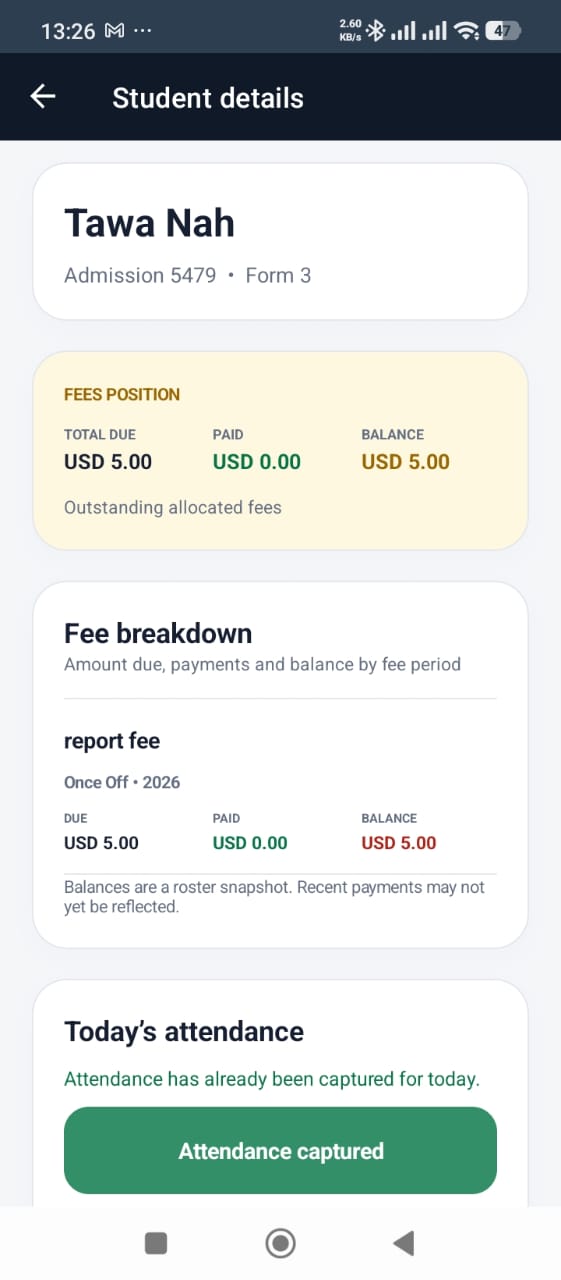
When the student details screen shows the current allocated fee position, the authorised user can understand whether a financial follow-up may be needed without calling the office for every learner.
A balance is context, not a public announcement
The amount should never be read aloud in a queue or shown to other learners. Schools should decide which roles may view it and move discussions to the bursar or administration team.
Use the breakdown to reduce confusion
The app can show total due, paid, balance and the related fee item. That detail helps staff distinguish a specific outstanding charge from a vague claim that the learner owes money.
Account for recent payments
The product screen notes that the balance is a roster snapshot and recent payments may not yet be reflected. Staff need an exception route for proof of payment or a disputed balance.
Keep attendance policy explicit
Each school remains responsible for deciding whether and how fee status affects gate procedures. Sekani supplies the verified record and attendance workflow; it does not replace the school’s policy, contractual obligations or applicable law.
See the workflow in Sekani
Sekani connects mobile attendance with the student record, school ID, fee context, offline synchronisation and parent or guardian communication. The most useful evaluation is a guided demonstration using your school’s own gate and attendance scenarios.